Faster RAM. What does that mean? For one, efficiency. Your CPU can now talk with your other PC components much faster. We measure this 'speed' in MHz or MT/s.
With most mainstream processors using DDR4 RAM, you should generally look for sticks supporting around 3000 MHz for a sweet spot with day-to-day use as well as gaming performance.
But how much does RAM speed really matter? How does it translate into real-world scenarios as well as gaming scenarios? Let's take a look.
Here's the test bench we have set up:
AMD Ryzen 9 3950x
2x16GB DDR4 3600MHz Memory
GTX 1650 Super
ASUS ROG Crosshair VIII Hero (WI-FI)
Sabrent 1TB Rocket NVMe 4.0 Gen4 PCIe M.2
Samsung 970 EVO SSD 1TB - M.2 NVMe
Seasonic FOCUS GX-850, 850W 80+ Gold
ROG Helios
EKWB Custom Liquid Cooling Loop
1080p 144Hz Monitor
To enable your RAM to run at its full speed, you'll have to tweak the BIOS settings a bit. For our ASUS motherboard, we will have to enable a setting called DOCP: an overclocking profile developed for AMD CPUs on ASUS motherboards. To do this, follow these steps:
Step 1: Press the F2 or Delete key during the boot-up process to enter BIOS.
Step 2: Press the F7 key to open the Advanced mode. Then, click the AI Tweaker option.
Step 3: Now click the dropdown key located right next to AI Overclock Tuner.
Step 4: Select D.O.C.P in the menu. At last, click Save & Exit or press the F10 key.

Setting up DOCP on an ASUS Motherboard.
Now we can proceed to see how much of a difference this overclock makes.
For this test, we will be comparing the RAM at 2133MHz with 3600MHz.
First taking a look at Cinebench R20, we saw a boost in performance of 1.25% in multicore performance and 1% in single core.

Before vs. After DOCP Cinebench R20.
In 3DMark TimeSpy, we observed a significant boost in performance for the CPU test.
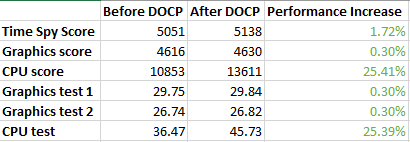
CPU scores drastically improve compared to GPU scores.
For day-to-day use, we used PCMark 10, and were able to find a performance boost of 5.27%.
Taking a look at gaming performance, here are how the FPS scores fared out:
GTAV: 20% Performance Increase
Forza Horizon 4: 8% Performance Increase
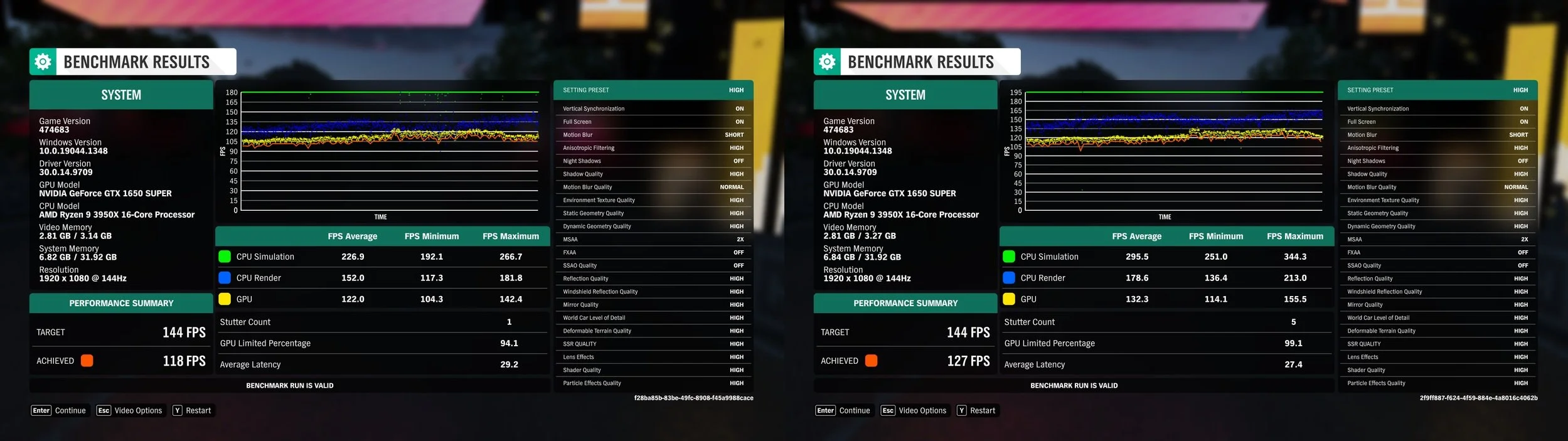
A growth from 118 FPS to 127 FPS is observed.
Needless to say, there is no reason why one shouldn't enable DOCP, other than warranty reasons, to get a performance boost for their PCs. It is quite a simple overclock that the motherboard calibrates itself, without much need for calculations and trial and error from the user. A simple, yet powerful overclock that's a great place to start for beginner overclockers to see for themselves the fruits of overclocking.